Ubuntu-BR LoCoTeam approval: what? already?

That’s it. The Ubuntu Brazilian LoCoTeam (ubuntu-br) was approved as an official LoCo this morning (morning at least here in brazil). The cool thing was to see the the Community Council and other people “unsure” about the approval, take a look at some random quotes from the meeting log:

<cypherbios> Hi all, it’s Brazil time now > https://wiki.ubuntu.com/BrazilianTeam

* jsgotangco wonders why brazilian team is here?

<jsgotangco> anyone from brazil explain why is there an application?

<AndreNoel> https://wiki.ubuntu.com/BrazilianTeam/ApprovalApplication

<dholbach> according to https://wiki.ubuntu.com/LoCoTeamList the Brazilian team is not approved yet - I was sure it was approved already :)

<cypherbios> dholbach: Not yet :)

<Fujitsu> It has been around for eeeever. It must be!

<jwendell> merely formality…

* pygi gives +3

<cypherbios> but please, take a look at the approvalapplication page before deciding (at least) hehehe

<jsgotangco> seems every region is well covered, nice!
<jsgotangco> (familiar names even)

* elkbuntu wonders why this actually needs discussion… :Þ

<jsgotangco> i’m more than happy to give my vote, but this is a very good example of a big country diversified in the efforts of building a country-covered loco each state has clear goals and reps

<dholbach> yes, I agree with jsgotangco - everywhere I looked seemed to be healthy brazilian ubuntu action going on - the forums, the wiki, the planet, etc: +1 from me

<all> Congrats Brazilian Team!

I think the brazilian team deserve all this credits, if some of yours are curious about, take a look at our approval application wiki page:
https://wiki.ubuntu.com/BrazilianTeam/ApprovalApplication

And the numbers are quite impressive:

Forums: 113.581 Messages in 20.222 Topics by 12.543 Members
Official Ubuntu Members: 16
Users that have been signed the Code of Conduct: 150
Users registered in the mailling lists: 1010
States coverage: 16/26
Website access average: 3000 uv/day
System translation status: 74% completo

Thanks to all the people that contribute to make us one of the world’s largest Ubuntu LoCoTeams!

APTonCD 0.2 is on the way…

…actually I call it 0.1.92 version “Hey, look at me now, seems like someone here grew up, huh?!” or yet “Guess what?! I have some good news for you” :)
If you don’t know what is aptoncd (/me wonders where have you been), take a look at the project page at sourceforge and launchpad.

Seems like some people thought we’ve sticked in the 0.1 version, but actually we’ve been working on the aptoncd 0.2 version since the first release. Fortunately now we have a lot of good news in result of a complete code and GUI rewrite we’ve working on in the last few months. APTonCD still doing exactly what it did before, but now more easy and intuitive than ever.

Laudeci is the python mage behind the code rewrite, he has implemented a lot of code improvements and organization to give a more efficient experience to user and a comfortable coding for us python-hackers.

I can’t tell you everything that was changed and included in aptoncd, I’d prefer you see it by yourself. Here is some of the highlights of this upcoming version:

APTonCD new logo
As you can see, now we have a new logo, thanks to vdepizzol for the great artwork — Tango-ishier. Other artists are incentived to make theirs own modifications of the icon to fit with any icon set, by calling it ‘aptoncd’, and also if someone wants to make a kde-ish icon to their set of icons (cristal, oxygen, I don’t know) are welcome.

The main window now looks like this:

But more beautiful than the main window is the Create window:

Notice that now aptoncd displays the information about the package in the treeview itself and a more detailed form in the header including the icon of the application if available:

Now you can add custom packages separately or point an entire folder to scan packages on it:

add button

As expected you can find a package in the list just by start typing its name and it will find as-you-type:

What do you think of installing packages directly from the aptoncd interface? If you select a package that is not installed and if you have gdebi installed, aptoncd offers the option to install that package by calling gdebi to do it for you:

Know so little about a package? Don’t worry, aptoncd shows you everything you need to know about that package without compromising the interface and usability with the properties window:

That’s right, I’ve selected the packages you want to put in the medium and now it’s time to click on “Burn…” you will be taken to this dialog:

While you wait until everything is done, you will see this progress dialog, and now we can track the progress of the mkisofs (genisoimage):

In the Restore side we already have some good improvements, as you can see here:

Well, that’s all I have time for. I’ll need to do more 3 or 4 posts to say half of the work we’ve done this last few months and keep you up-to-date.

Any comments, feedback, question are very appreciated. See you.

Hello world (again)!

Well, seems like CypherBIOS hasn’t a persistent memory, then you ask me: “Why the hell he can’t keep all the blog posts for more than one year?”. Well, maybe some of yours has already noticed that this is the third time I’ve decided to erase all the archieves of my virtual log (read blog).

Perhaps this is not a option, I don’t know, but then I need to ask to myself what is the importance of a blog achieve. What is more important, all you’ve ever written some day or what you aim to write in the future? I don’t know for sure, and I think I’m far away to discover, I’m the type of guy who don’t keep the memories from the past (yep I know, very sad), and any little move in my blog is enough to leave everything behind and do not import my old databases — this time I’ve changed the hosting server and decided do not import the wordpress db.

Well, but I don’t think this is a bad thing, perhaps each time I do it is a new step — to raise often we need to leave everything behind, and it includes the blog posts :P
This time I’ve decided to use this opportunity to polish a little the blog. To blog is not something I really love to do, for this reason I consider my blog a little abandoned, and I decided to solve some of my previously problems with the wordpress, one of them was the necessity of a multilangual plugin (or would be multilingue?), because to keep two wordpress instances, one for a pt-br version and another one for a english version isn’t something really easy.

I’d like to share with the readers (actually this was the initial idea of the post) the plugin that worked for me: Gengo. This is a multilangual plugin to maintain a multilangual blog (in my case one and half language as my english is very poor yet, but I’m already working on it).

With Gengo you can make a post on your primary language (in my case pt-br) and then translate it for you secondary one and associate it with the original post. The biggest trick is that Gengo is capable to detect the idiom of the visitor’s browser and show the page in their idiom or the closest of it (when available). If the visitor’s idiom isn’t compatible with any other written in the blog, is showed the standard english version (or any other defined by the blogger).

And it doesn’t works only for posts, but also for the pages, feeds, categories, title of the blog and so forth. If you liked the plugin, you can download it here and the installation is like usually.

Check my blog to see how it works:

Accessing directly by http://www.cypherbios.org/blog if your browser is in portuguese the blog will be displayed in your idiom (the posts available on it), if don’t will display in the standard english. If you want to switch the languages, just use the lateral links to see the pt-br and ingles versions. Once selected the preferred idiom it saves your preference for the next visits. And for visualize only one post in the other idiom you just need to change/add at the end of the url the tag &language=$LANG replacing $LANG by pt or en, depending on the languages of your blog.

I’ll try to use this feature to praticize more my english. And now new life (again). I aim to turn the blog a little more attractive and perhaps more interesting, incentive the comments (comments are cool, I like comments) and post with more frequency.

For those who are missing the old posts: thank you so much. For those who don’t care: well, thank you too, because I also don’t care

More intuitive than ever

When using a aptoncd generated medium (removable repository), what could be easier than insert it in the drive, open aptoncd and then click on “Add CD/DVD…”?? This:

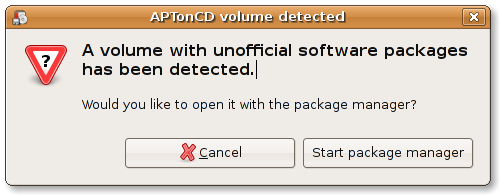
Now it isn’t needed anymore! Ubuntu now is capable to recognise an medium created by aptoncd at the moment it is inserted in the drive, it without even has aptoncd neither any other additional software installed, in a fresh Ubuntu Gutsy installation all you need to do is put the CD or DVD in the drive and you’ll see the following dialog:

“APTonCD volume detected”

If you click on “Start package manager” Synaptic will automatically add the medium as APT source and you will be able to immediately start installing software from it.

Ubuntu (update-notifier + dbus) watches the mounted devices, and when a medium with packages (official Ubuntu CD/DVD or an aptoncd one) is detected it automatically call this dialog. This last one thanks by a patch I’ve sent to mvo and it was merged into the update-notifier branch and is already available in gutsy (thanks Michael).

New Ubuntu Brazilian Community Website

I’m proud to announce the new Ubuntu Brazilian community website.

http://www.ubuntu-br.org

Completely reformulated, aiming at consistency, usability, content and a better browsing experience and information.

I’d write a little booklet about it, but I’m sure it’s better you see the result by yourself, take a look and get amazed.

Keeping the visual identity of the official website, now we have a more dinamic site with all the information needed by all kinds of visitors.

The banner above says: “Fast, Secure, Easy and Free” in portuguese

Between the new created pages, I highlight those ones (obviously, all in Brazilian Portuguese):

  • Start Here — Want to enter in this new world but don’t know where to start from? Start here!
  • What is Ubuntu — What is all this about? Get knowing what is Ubuntu and its meaning.
  • How to get Ubuntu — All the ways available to get Ubuntu right now.
  • Download — Don’t wait anymore. A easy-to-use wizard to Download you copy of Ubuntu from BR mirros (thanks newz)
  • How to get help and support — Got a problem or doubt with Ubuntu? Don’t worry, here you can get local community support.
  • Community — Get knowing what is the community and where it lives
  • Code of Conduct — The Ubuntu Code Of Conduct translated to brazilian portuguese and also being the foundation of our local community
  • Get Involved — Everything looks so amazing, huh?! Get involved and contribute to all this get even better.

All the sections makes references and instructions for our own local resources, our people and everything in pt_BR.
With this improvement the Ubuntu-BR website becomes, more than ever, the definitive reference of the Ubuntu operating system and its community in Brazil!


I want to thanks:

  • Licio Fernando — by the patient and help in the migration on the server-side;
  • Vinícius Depizzol — by the artwork with the banner in the homepage;
  • Raul Pereira and Guilherme Paula — by the feedback and suggestion aiming usability and better browsing experience;
  • Rafael Sfair — by helping in the writing some of the pages.