Quick 5 step guide to ultimate offline computer restoration

- By Ryan Grieve

“Your quick and easy 5 step guide to ultimate offline computer restoration.

  • Step 1.
    Download and burn your favourite flavour of Ubuntu direct from the interwob.
  • Step 2.
    Stick the freshly toasted Internet Freedom Disc into the drive on the front of your Compubox
  • Step 3.
    Boot up the magical disc and install your own piece of Open Source Heaven.
  • Step 4.
    Now, using your favourite package manager, download and install EVERY one of your favourite little open source gems. (especially AptOnCD)
  • Step 5.
    Run AptOnCD and create your very own CD repository of all the packages you have downloaded…. everything you need to get your computer back to this ideal state without a net connection!!

Now, you can take both your beautiful Ubuntu Disk and that Shiny New AptOnCD Disk and store them away somewhere safe. Sleep easy tonight knowing that even without the big-bad interweave, you can still make your computer….. dance!”

I came across this blog post early today, and indeed this is a very simple, easy and quick example of using aptoncd to keep your installed packages safe. I’d shrink this to 3 steps cutting 2 unessential, but this post is not mine and I’m thankful for the author :)

aptoncd 0.1.95 on Ubuntu Gutsy and call for testers

APTonCD 0.1.95 is ready for use in the Gutsy repositories.

$ sudo apt-get install aptoncd

Every feedback are welcome, please test it and report any bug or make any suggestion, I’ll be glad on responding it. The main changes are slightly described on this post.

Note that there are a lot of GUI changes and code rewrite (I’d say that the entire GUI and code was rewritten) since the last release, so if you notice some glitch, bug, bad behaviour or just didn’t like the changes, please let me know.

Unfortunately, due to all this ‘rewrite stuff’ the translations of the 0.1 version aren’t suitable for this new version, as we had more than 90% of the strings changed, so I’m afraid that I had to drop the these 90% of strings in the 37 languages that aptoncd is available so far. I urge all the translators, collaborators and anyone who want aptoncd translated to his/her native language, that translate the newly imported template!

I’d like to thank mpt for the precious comments regarding the GUI design and behaviour that he gave us, I’m sure that there is a lot of room for improvement and he will help us on it. And, of course needless to say, Pretto, without him nothing of this would be possible.

CD/DVD covers for Ubuntu and APTonCD

I came across early today with this nice post (pt-br), where nq6 shows up his recent artwork cover for Ubuntu and APTonCD discs.

The Ubuntu covers has tags and is written in Brazilian Portuguese, so you will see phrases such like “Linux para seres humanos”. The text makes reference to our community resources, pointing to the website, forums, etc. However, anyone can use the covers as some of it is almost language-independent.

I couldn’t quite believe when I saw which is part of the set two awesome APTonCD covers. So you can create your installation disc using aptoncd, burn it and print this beautiful cover to stick on your disc. This is great for having with you the additional disc to install applications in your friend’s computer and so forth.

I’ll ask Fred (the creator) to make some covers more ‘language-independent’ then more people can use it. I’ll post them here latter.

APTonCD 0.2 is on the way…

…actually I call it 0.1.92 version “Hey, look at me now, seems like someone here grew up, huh?!” or yet “Guess what?! I have some good news for you” :)
If you don’t know what is aptoncd (/me wonders where have you been), take a look at the project page at sourceforge and launchpad.

Seems like some people thought we’ve sticked in the 0.1 version, but actually we’ve been working on the aptoncd 0.2 version since the first release. Fortunately now we have a lot of good news in result of a complete code and GUI rewrite we’ve working on in the last few months. APTonCD still doing exactly what it did before, but now more easy and intuitive than ever.

Laudeci is the python mage behind the code rewrite, he has implemented a lot of code improvements and organization to give a more efficient experience to user and a comfortable coding for us python-hackers.

I can’t tell you everything that was changed and included in aptoncd, I’d prefer you see it by yourself. Here is some of the highlights of this upcoming version:

APTonCD new logo
As you can see, now we have a new logo, thanks to vdepizzol for the great artwork — Tango-ishier. Other artists are incentived to make theirs own modifications of the icon to fit with any icon set, by calling it ‘aptoncd’, and also if someone wants to make a kde-ish icon to their set of icons (cristal, oxygen, I don’t know) are welcome.

The main window now looks like this:

But more beautiful than the main window is the Create window:

Notice that now aptoncd displays the information about the package in the treeview itself and a more detailed form in the header including the icon of the application if available:

Now you can add custom packages separately or point an entire folder to scan packages on it:

add button

As expected you can find a package in the list just by start typing its name and it will find as-you-type:

What do you think of installing packages directly from the aptoncd interface? If you select a package that is not installed and if you have gdebi installed, aptoncd offers the option to install that package by calling gdebi to do it for you:

Know so little about a package? Don’t worry, aptoncd shows you everything you need to know about that package without compromising the interface and usability with the properties window:

That’s right, I’ve selected the packages you want to put in the medium and now it’s time to click on “Burn…” you will be taken to this dialog:

While you wait until everything is done, you will see this progress dialog, and now we can track the progress of the mkisofs (genisoimage):

In the Restore side we already have some good improvements, as you can see here:

Well, that’s all I have time for. I’ll need to do more 3 or 4 posts to say half of the work we’ve done this last few months and keep you up-to-date.

Any comments, feedback, question are very appreciated. See you.
More intuitive than ever

When using a aptoncd generated medium (removable repository), what could be easier than insert it in the drive, open aptoncd and then click on “Add CD/DVD…”?? This:

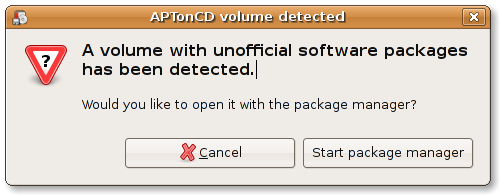
Now it isn’t needed anymore! Ubuntu now is capable to recognise an medium created by aptoncd at the moment it is inserted in the drive, it without even has aptoncd neither any other additional software installed, in a fresh Ubuntu Gutsy installation all you need to do is put the CD or DVD in the drive and you’ll see the following dialog:

“APTonCD volume detected”

If you click on “Start package manager” Synaptic will automatically add the medium as APT source and you will be able to immediately start installing software from it.

Ubuntu (update-notifier + dbus) watches the mounted devices, and when a medium with packages (official Ubuntu CD/DVD or an aptoncd one) is detected it automatically call this dialog. This last one thanks by a patch I’ve sent to mvo and it was merged into the update-notifier branch and is already available in gutsy (thanks Michael).